
Boost Productivity 31% with Screen Time Reduction 2026
Mak Kordić
,
March 6, 2026


Professionals lose hours daily to digital distractions, sacrificing focus and mental clarity. Reducing your screen time by about 25-30% can increase productivity by over 31%, making the right strategy essential. This article examines evidence-backed methods to reclaim your time, from physical NFC tags to behavioral habits and AI tools, helping you choose the best approach for your professional needs.
Table of Contents
- Selection Criteria For Screen Time Reduction Methods
- Physical NFC Tag Systems To Break Phone Usage Habits
- Digital Detox Habits For Intentional Screen Time Management
- Built-In App Timers And Restrictions On Smartphones
- Digital Sunset Habit To Improve Sleep And Productivity
- AI-Powered Screen Time Management Tools
- Workplace Screen Time Policies To Reduce Digital Burnout
- Summary Comparison And Situational Recommendations
- Ready To Boost Your Productivity And Break Screen Addiction?
Selection Criteria for Screen Time Reduction Methods
Choosing the right screen time reduction method determines whether you succeed or fail. Effectiveness, ease of use, compatibility, cost, and productivity impact are critical selection criteria that separate solutions that work from those that waste your time.
Prioritize methods proven to reduce screen time measurably. Look for approaches that fit seamlessly into your professional workflow without constant willpower. Consider whether a solution works across devices or requires specific environments.
Key criteria for evaluating methods:
- Effectiveness in reducing daily screen time by measurable hours
- Ease of implementation without disrupting essential work tasks
- Compatibility with professional environments and client interactions
- Cost relative to long-term value and sustainability
- Evidence-based impact on focus, productivity, and mental clarity
Understanding these factors empowers you to select solutions matching your specific needs. Some professionals benefit from physical interventions breaking autopilot habits, while others need behavioral frameworks or technology-driven personalization. Building mindful tech habits starts with knowing what works for your situation.
Physical NFC Tag Systems to Break Phone Usage Habits
Physical NFC tags create tangible friction that interrupts automatic phone checking. Physical NFC tag systems reduce daily screen time by an average of 1 hour 39 minutes through tactile interruptions, making them powerful tools for professionals stuck in digital autopilot.

These systems work by requiring you to physically tap your phone against a tag to unlock distracting apps. The deliberate action breaks the unconscious reach for your device. You place tags in strategic locations like your desk, bedroom, or kitchen, forcing conscious choices about phone use.
Pro Tip: Place your NFC tag in a location requiring 10-15 seconds of walking to create enough friction to reconsider impulsive phone checking.
NFC tag systems offer several advantages:
- Creates physical barrier preventing autopilot phone habits
- Simple setup with customizable app restrictions
- Portable solution working across home and office environments
- Low-cost alternative to expensive digital wellness subscriptions
- No complex behavior change required beyond initial setup
Physical phone blockers prove especially effective for professionals whose work requires smartphones but struggle with social media or news app compulsions. The tangible nature of tapping a tag provides a psychological reset that app-only solutions cannot match. This approach complements other strategies for minimizing device distractions throughout your workday.
Digital Detox Habits for Intentional Screen Time Management
Digital detox habits involve behavioral boundaries that reshape your relationship with technology. Two-week digital detox reduces screen time by up to 5 hours daily, improving attention span and lowering anxiety, offering profound benefits for mental clarity and professional performance.
Effective detox practices include restricting internet access during specific hours, creating phone-free zones in your home, and establishing device curfews. These boundaries force intentional choices about when and how you engage with screens. The key lies in consistency rather than perfection.
Successful digital detox strategies:
- Designate specific rooms as phone-free zones, especially bedrooms
- Set recurring calendar blocks for internet-free deep work
- Charge devices outside your bedroom to prevent morning scrolling
- Replace evening screen time with physical activities or reading
- Use weekends for extended screen-free periods
Pro Tip: Start with a 48-hour weekend detox to experience immediate benefits before committing to longer-term restrictions.
These habits work best when integrated gradually. Begin with one phone-free hour daily, then expand as you notice improved focus and reduced anxiety. The behavioral framework supports natural screen time reduction methods that build sustainable change rather than relying on temporary willpower.
Built-In App Timers and Restrictions on Smartphones
Native smartphone features provide immediate, zero-cost tools for limiting app usage. Setting app timers and daily limits with built-in tools reduces screen time by 1-2 hours on average, making them accessible first steps for budget-conscious professionals.
Both iOS Screen Time and Android Digital Wellbeing offer granular controls over individual apps and overall device usage. You set daily limits for social media, news apps, or games, receiving notifications when approaching these boundaries. The visual feedback creates awareness about consumption patterns.
Effective use of built-in timers:
- Set aggressive limits initially, then adjust based on actual needs
- Enable downtime schedules blocking non-essential apps during work hours
- Review weekly reports to identify unexpected time sinks
- Require passcode override for limit extensions to add friction
- Share limits with accountability partners for added motivation
The challenge with native tools lies in their ease of override. A single tap dismisses limits, requiring strong self-discipline. They work best for users motivated by data and comfortable with self-monitoring. Combining these controls with other methods like using lock apps effectively creates multiple layers of protection against impulsive phone use.
Digital Sunset Habit to Improve Sleep and Productivity
Stopping screen use one hour before bedtime dramatically improves sleep quality and next-day performance. A digital sunset routine improves sleep quality by 23% and reduces insomnia from blue light exposure, directly enhancing the mental clarity and stamina professionals need.
Blue light from screens suppresses melatonin production, making it harder to fall asleep and reducing sleep quality. The digital sunset creates a buffer zone allowing your brain to prepare for rest naturally. This single habit compounds benefits across productivity, mood regulation, and cognitive function.
Implementing your digital sunset:
- Set a daily alarm one hour before target bedtime
- Replace evening scrolling with reading, journaling, or conversation
- Charge devices in another room to eliminate temptation
- Use blue light blocking glasses if screens are unavoidable
- Track sleep quality improvements to reinforce the habit
This approach proves especially valuable for professionals experiencing evening anxiety or racing thoughts. The screen-free wind-down period allows mental processing of the day's events. Pairing digital sunset with other practices supports breaking screen addiction for better sleep and sustained professional performance.
AI-Powered Screen Time Management Tools
AI-driven digital wellness apps offer personalized, adaptive approaches to screen time reduction. AI-powered tools improve adherence to screen time limits by 15% through personalized and adaptive management features, making them ideal for tech-savvy professionals seeking optimization.
These platforms analyze your usage patterns, mood correlations, and productivity cycles to suggest customized interventions. They adapt limits dynamically based on your actual behavior rather than imposing rigid rules. Features include predictive notifications warning about excessive use before it happens and cross-device synchronization.
Advantages of AI-powered solutions:
- Personalized recommendations based on individual usage patterns
- Mood tracking revealing correlations between screen time and well-being
- Adaptive limits that tighten during high-productivity periods
- Integration with productivity apps for holistic workflow management
- Gamification elements increasing motivation through achievement tracking
The higher adherence rates stem from the tools feeling helpful rather than restrictive. They guide rather than block, appealing to professionals who resist heavy-handed controls. Combining AI insights with structured routines creates a smart workflow to healthy phone use that evolves with your needs. These technologies also support boosting productivity naturally with AI through intelligent time management.
Workplace Screen Time Policies to Reduce Digital Burnout
Organizational policies create systemic support for healthier screen habits across teams. Workplace policies restricting meetings and after-hours communication boost productivity by 12% and lower employee burnout, demonstrating the power of collective boundaries.
Effective policies include no-meeting blocks for focused work, restrictions on after-hours emails and messages, and designated screen-free collaboration times. These frameworks remove individual burden by establishing clear expectations across the organization. They signal that digital wellness matters to leadership.
Successful workplace screen time initiatives:
- Four-hour no-meeting blocks twice weekly for deep work
- Automatic email delays preventing after-hours communication
- Meeting-free Fridays or designated focus days
- Encouragement of walking meetings without devices
- Regular training on digital wellness and boundary setting
These policies prove especially valuable in always-on work cultures where individual efforts face social pressure. Company-wide adoption normalizes screen breaks and focused work periods. Organizations implementing these practices report improved employee satisfaction alongside productivity gains. Professionals can advocate for these changes while personally implementing strategies to minimize device distractions at work.
Summary Comparison and Situational Recommendations
Each screen time reduction method offers distinct advantages depending on your specific needs and constraints. Understanding which approach fits your situation ensures you invest effort in strategies that actually work.
Choose physical NFC tags if you struggle with unconscious phone checking and need tangible interruptions. Digital detox habits work best when you have flexibility in your schedule and prioritize deep mental clarity. Built-in timers suit professionals wanting quick wins without financial investment.
The digital sunset routine proves essential for anyone experiencing sleep difficulties or evening anxiety. AI-powered tools appeal to data-driven individuals comfortable with technology managing their technology. Workplace policies require organizational buy-in but create sustainable team-wide improvements.
Most professionals benefit from combining multiple approaches. Start with one primary method matching your biggest challenge, then layer additional strategies as habits solidify. This creates redundant systems protecting against different types of digital distraction. Exploring natural screen time reduction methods helps identify which combination works best for your unique situation.
Ready to Boost Your Productivity and Break Screen Addiction?
You now understand the evidence-backed methods for reducing screen time and reclaiming professional focus. Turning knowledge into action requires the right tools and support.
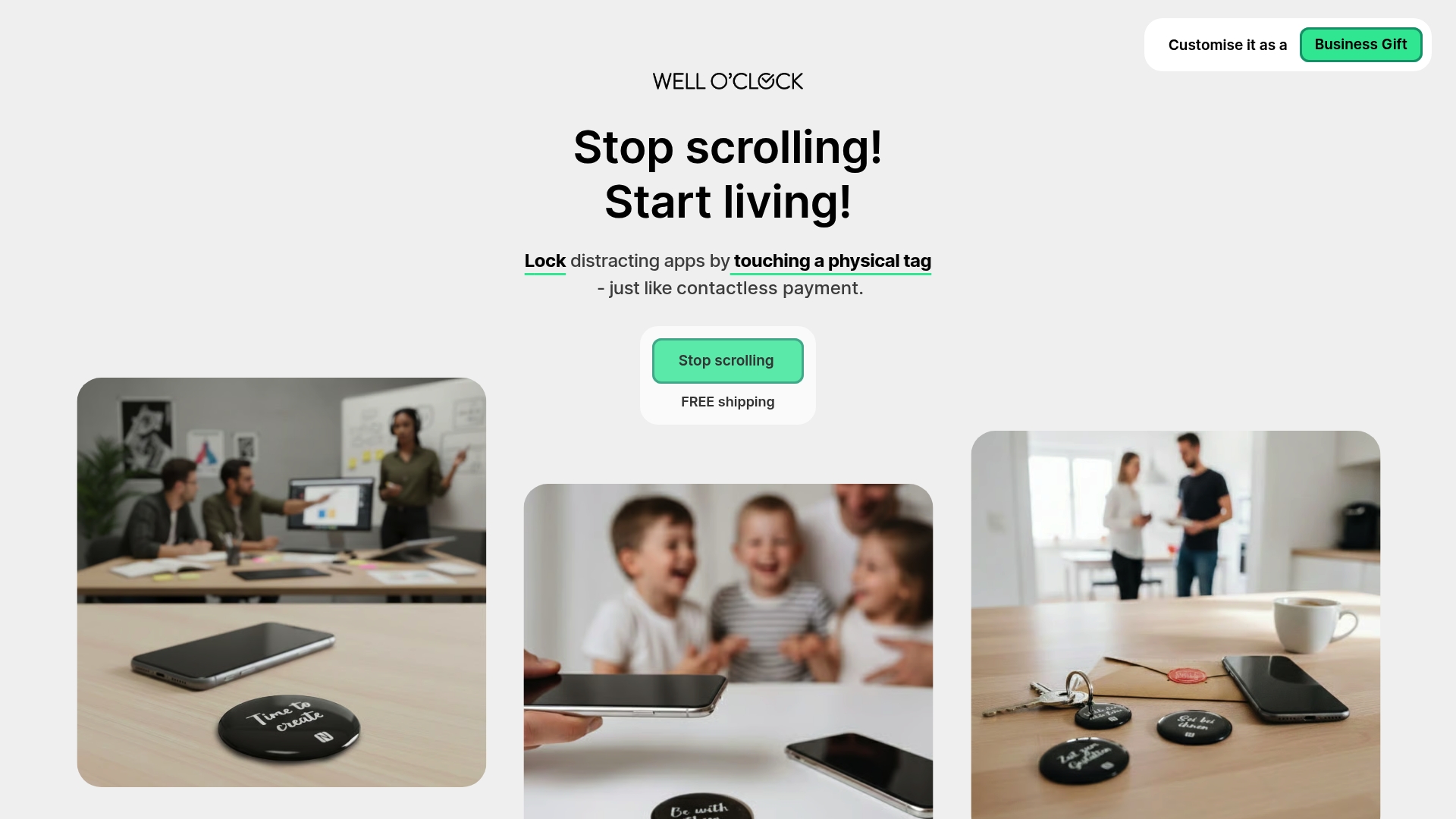
Explore our NFC tag digital wellness solutions designed to create physical interruptions breaking phone autopilot. Discover expert guides to minimize device distractions throughout your workday. Learn our proven smart workflow for healthy phone use that builds sustainable habits. Start today and experience the clarity that comes from controlling your technology rather than letting it control you.
FAQ
What is the best way to start reducing screen time for productivity?
Begin by tracking your current screen time for three days to establish a baseline and identify your biggest time sinks. Then select one method from this article matching your primary challenge, whether that is autopilot checking, evening scrolling, or work-hour distractions.
How do physical NFC tags help break phone addiction?
Physical NFC tag systems require you to physically tap your phone against a tag before accessing restricted apps, creating deliberate friction. This interruption breaks the unconscious reach for your device, forcing a conscious decision about whether you genuinely need your phone right now.
Is willpower enough to reduce screen time effectively?
Willpower alone typically fails because phone habits operate on autopilot below conscious awareness. Effective screen time reduction methods combine external structure like physical barriers or app controls with behavioral frameworks that reduce reliance on moment-to-moment discipline.
Can workplace policies really improve screen time habits and productivity?
Yes, structured workplace screen time policies remove individual burden by creating team-wide expectations and norms. Research shows these policies boost productivity by 12% while reducing burnout through clear boundaries that prevent always-on work cultures.
How long does it take to see productivity benefits from reducing screen time?
Most professionals notice improved focus and energy within two weeks of consistent screen time reduction. Sustained benefits emerge after four to six weeks as new habits solidify and your brain adapts to longer periods of uninterrupted attention.

Mak Kordić
Co founder
Mak Kordić is the founder and CEO of CNJ Digital, an agency based in Ljubljana, where he and his team develop UX/UI and digital products for demanding B2B projects. Over his career, he has led and co-created hundreds of digital solutions and worked with international clients.







Boost Productivity 31% with Screen Time Reduction 2026
Mak Kordić
,
March 6, 2026
Professionals lose hours daily to digital distractions, sacrificing focus and mental clarity. Reducing your screen time by about 25-30% can increase productivity by over 31%, making the right strategy essential. This article examines evidence-backed methods to reclaim your time, from physical NFC tags to behavioral habits and AI tools, helping you choose the best approach for your professional needs.
Table of Contents
- Selection Criteria For Screen Time Reduction Methods
- Physical NFC Tag Systems To Break Phone Usage Habits
- Digital Detox Habits For Intentional Screen Time Management
- Built-In App Timers And Restrictions On Smartphones
- Digital Sunset Habit To Improve Sleep And Productivity
- AI-Powered Screen Time Management Tools
- Workplace Screen Time Policies To Reduce Digital Burnout
- Summary Comparison And Situational Recommendations
- Ready To Boost Your Productivity And Break Screen Addiction?
Selection Criteria for Screen Time Reduction Methods
Choosing the right screen time reduction method determines whether you succeed or fail. Effectiveness, ease of use, compatibility, cost, and productivity impact are critical selection criteria that separate solutions that work from those that waste your time.
Prioritize methods proven to reduce screen time measurably. Look for approaches that fit seamlessly into your professional workflow without constant willpower. Consider whether a solution works across devices or requires specific environments.
Key criteria for evaluating methods:
- Effectiveness in reducing daily screen time by measurable hours
- Ease of implementation without disrupting essential work tasks
- Compatibility with professional environments and client interactions
- Cost relative to long-term value and sustainability
- Evidence-based impact on focus, productivity, and mental clarity
Understanding these factors empowers you to select solutions matching your specific needs. Some professionals benefit from physical interventions breaking autopilot habits, while others need behavioral frameworks or technology-driven personalization. Building mindful tech habits starts with knowing what works for your situation.
Physical NFC Tag Systems to Break Phone Usage Habits
Physical NFC tags create tangible friction that interrupts automatic phone checking. Physical NFC tag systems reduce daily screen time by an average of 1 hour 39 minutes through tactile interruptions, making them powerful tools for professionals stuck in digital autopilot.
These systems work by requiring you to physically tap your phone against a tag to unlock distracting apps. The deliberate action breaks the unconscious reach for your device. You place tags in strategic locations like your desk, bedroom, or kitchen, forcing conscious choices about phone use.
Pro Tip: Place your NFC tag in a location requiring 10-15 seconds of walking to create enough friction to reconsider impulsive phone checking.
NFC tag systems offer several advantages:
- Creates physical barrier preventing autopilot phone habits
- Simple setup with customizable app restrictions
- Portable solution working across home and office environments
- Low-cost alternative to expensive digital wellness subscriptions
- No complex behavior change required beyond initial setup
Physical phone blockers prove especially effective for professionals whose work requires smartphones but struggle with social media or news app compulsions. The tangible nature of tapping a tag provides a psychological reset that app-only solutions cannot match. This approach complements other strategies for minimizing device distractions throughout your workday.
Digital Detox Habits for Intentional Screen Time Management
Digital detox habits involve behavioral boundaries that reshape your relationship with technology. Two-week digital detox reduces screen time by up to 5 hours daily, improving attention span and lowering anxiety, offering profound benefits for mental clarity and professional performance.
Effective detox practices include restricting internet access during specific hours, creating phone-free zones in your home, and establishing device curfews. These boundaries force intentional choices about when and how you engage with screens. The key lies in consistency rather than perfection.
Successful digital detox strategies:
- Designate specific rooms as phone-free zones, especially bedrooms
- Set recurring calendar blocks for internet-free deep work
- Charge devices outside your bedroom to prevent morning scrolling
- Replace evening screen time with physical activities or reading
- Use weekends for extended screen-free periods
Pro Tip: Start with a 48-hour weekend detox to experience immediate benefits before committing to longer-term restrictions.
These habits work best when integrated gradually. Begin with one phone-free hour daily, then expand as you notice improved focus and reduced anxiety. The behavioral framework supports natural screen time reduction methods that build sustainable change rather than relying on temporary willpower.
Built-In App Timers and Restrictions on Smartphones
Native smartphone features provide immediate, zero-cost tools for limiting app usage. Setting app timers and daily limits with built-in tools reduces screen time by 1-2 hours on average, making them accessible first steps for budget-conscious professionals.
Both iOS Screen Time and Android Digital Wellbeing offer granular controls over individual apps and overall device usage. You set daily limits for social media, news apps, or games, receiving notifications when approaching these boundaries. The visual feedback creates awareness about consumption patterns.
Effective use of built-in timers:
- Set aggressive limits initially, then adjust based on actual needs
- Enable downtime schedules blocking non-essential apps during work hours
- Review weekly reports to identify unexpected time sinks
- Require passcode override for limit extensions to add friction
- Share limits with accountability partners for added motivation
The challenge with native tools lies in their ease of override. A single tap dismisses limits, requiring strong self-discipline. They work best for users motivated by data and comfortable with self-monitoring. Combining these controls with other methods like using lock apps effectively creates multiple layers of protection against impulsive phone use.
Digital Sunset Habit to Improve Sleep and Productivity
Stopping screen use one hour before bedtime dramatically improves sleep quality and next-day performance. A digital sunset routine improves sleep quality by 23% and reduces insomnia from blue light exposure, directly enhancing the mental clarity and stamina professionals need.
Blue light from screens suppresses melatonin production, making it harder to fall asleep and reducing sleep quality. The digital sunset creates a buffer zone allowing your brain to prepare for rest naturally. This single habit compounds benefits across productivity, mood regulation, and cognitive function.
Implementing your digital sunset:
- Set a daily alarm one hour before target bedtime
- Replace evening scrolling with reading, journaling, or conversation
- Charge devices in another room to eliminate temptation
- Use blue light blocking glasses if screens are unavoidable
- Track sleep quality improvements to reinforce the habit
This approach proves especially valuable for professionals experiencing evening anxiety or racing thoughts. The screen-free wind-down period allows mental processing of the day's events. Pairing digital sunset with other practices supports breaking screen addiction for better sleep and sustained professional performance.
AI-Powered Screen Time Management Tools
AI-driven digital wellness apps offer personalized, adaptive approaches to screen time reduction. AI-powered tools improve adherence to screen time limits by 15% through personalized and adaptive management features, making them ideal for tech-savvy professionals seeking optimization.
These platforms analyze your usage patterns, mood correlations, and productivity cycles to suggest customized interventions. They adapt limits dynamically based on your actual behavior rather than imposing rigid rules. Features include predictive notifications warning about excessive use before it happens and cross-device synchronization.
Advantages of AI-powered solutions:
- Personalized recommendations based on individual usage patterns
- Mood tracking revealing correlations between screen time and well-being
- Adaptive limits that tighten during high-productivity periods
- Integration with productivity apps for holistic workflow management
- Gamification elements increasing motivation through achievement tracking
The higher adherence rates stem from the tools feeling helpful rather than restrictive. They guide rather than block, appealing to professionals who resist heavy-handed controls. Combining AI insights with structured routines creates a smart workflow to healthy phone use that evolves with your needs. These technologies also support boosting productivity naturally with AI through intelligent time management.
Workplace Screen Time Policies to Reduce Digital Burnout
Organizational policies create systemic support for healthier screen habits across teams. Workplace policies restricting meetings and after-hours communication boost productivity by 12% and lower employee burnout, demonstrating the power of collective boundaries.
Effective policies include no-meeting blocks for focused work, restrictions on after-hours emails and messages, and designated screen-free collaboration times. These frameworks remove individual burden by establishing clear expectations across the organization. They signal that digital wellness matters to leadership.
Successful workplace screen time initiatives:
- Four-hour no-meeting blocks twice weekly for deep work
- Automatic email delays preventing after-hours communication
- Meeting-free Fridays or designated focus days
- Encouragement of walking meetings without devices
- Regular training on digital wellness and boundary setting
These policies prove especially valuable in always-on work cultures where individual efforts face social pressure. Company-wide adoption normalizes screen breaks and focused work periods. Organizations implementing these practices report improved employee satisfaction alongside productivity gains. Professionals can advocate for these changes while personally implementing strategies to minimize device distractions at work.
Summary Comparison and Situational Recommendations
Each screen time reduction method offers distinct advantages depending on your specific needs and constraints. Understanding which approach fits your situation ensures you invest effort in strategies that actually work.
Choose physical NFC tags if you struggle with unconscious phone checking and need tangible interruptions. Digital detox habits work best when you have flexibility in your schedule and prioritize deep mental clarity. Built-in timers suit professionals wanting quick wins without financial investment.
The digital sunset routine proves essential for anyone experiencing sleep difficulties or evening anxiety. AI-powered tools appeal to data-driven individuals comfortable with technology managing their technology. Workplace policies require organizational buy-in but create sustainable team-wide improvements.
Most professionals benefit from combining multiple approaches. Start with one primary method matching your biggest challenge, then layer additional strategies as habits solidify. This creates redundant systems protecting against different types of digital distraction. Exploring natural screen time reduction methods helps identify which combination works best for your unique situation.
Ready to Boost Your Productivity and Break Screen Addiction?
You now understand the evidence-backed methods for reducing screen time and reclaiming professional focus. Turning knowledge into action requires the right tools and support.
Explore our NFC tag digital wellness solutions designed to create physical interruptions breaking phone autopilot. Discover expert guides to minimize device distractions throughout your workday. Learn our proven smart workflow for healthy phone use that builds sustainable habits. Start today and experience the clarity that comes from controlling your technology rather than letting it control you.
FAQ
What is the best way to start reducing screen time for productivity?
Begin by tracking your current screen time for three days to establish a baseline and identify your biggest time sinks. Then select one method from this article matching your primary challenge, whether that is autopilot checking, evening scrolling, or work-hour distractions.
How do physical NFC tags help break phone addiction?
Physical NFC tag systems require you to physically tap your phone against a tag before accessing restricted apps, creating deliberate friction. This interruption breaks the unconscious reach for your device, forcing a conscious decision about whether you genuinely need your phone right now.
Is willpower enough to reduce screen time effectively?
Willpower alone typically fails because phone habits operate on autopilot below conscious awareness. Effective screen time reduction methods combine external structure like physical barriers or app controls with behavioral frameworks that reduce reliance on moment-to-moment discipline.
Can workplace policies really improve screen time habits and productivity?
Yes, structured workplace screen time policies remove individual burden by creating team-wide expectations and norms. Research shows these policies boost productivity by 12% while reducing burnout through clear boundaries that prevent always-on work cultures.
How long does it take to see productivity benefits from reducing screen time?
Most professionals notice improved focus and energy within two weeks of consistent screen time reduction. Sustained benefits emerge after four to six weeks as new habits solidify and your brain adapts to longer periods of uninterrupted attention.
Mak Kordić
Co founder
Mak Kordić is the founder and CEO of CNJ Digital, an agency based in Ljubljana, where he and his team develop UX/UI and digital products for demanding B2B projects. Over his career, he has led and co-created hundreds of digital solutions and worked with international clients.
Boost Productivity 31% with Screen Time Reduction 2026
Mak Kordić
,
March 6, 2026
Professionals lose hours daily to digital distractions, sacrificing focus and mental clarity. Reducing your screen time by about 25-30% can increase productivity by over 31%, making the right strategy essential. This article examines evidence-backed methods to reclaim your time, from physical NFC tags to behavioral habits and AI tools, helping you choose the best approach for your professional needs.
Table of Contents
- Selection Criteria For Screen Time Reduction Methods
- Physical NFC Tag Systems To Break Phone Usage Habits
- Digital Detox Habits For Intentional Screen Time Management
- Built-In App Timers And Restrictions On Smartphones
- Digital Sunset Habit To Improve Sleep And Productivity
- AI-Powered Screen Time Management Tools
- Workplace Screen Time Policies To Reduce Digital Burnout
- Summary Comparison And Situational Recommendations
- Ready To Boost Your Productivity And Break Screen Addiction?
Selection Criteria for Screen Time Reduction Methods
Choosing the right screen time reduction method determines whether you succeed or fail. Effectiveness, ease of use, compatibility, cost, and productivity impact are critical selection criteria that separate solutions that work from those that waste your time.
Prioritize methods proven to reduce screen time measurably. Look for approaches that fit seamlessly into your professional workflow without constant willpower. Consider whether a solution works across devices or requires specific environments.
Key criteria for evaluating methods:
- Effectiveness in reducing daily screen time by measurable hours
- Ease of implementation without disrupting essential work tasks
- Compatibility with professional environments and client interactions
- Cost relative to long-term value and sustainability
- Evidence-based impact on focus, productivity, and mental clarity
Understanding these factors empowers you to select solutions matching your specific needs. Some professionals benefit from physical interventions breaking autopilot habits, while others need behavioral frameworks or technology-driven personalization. Building mindful tech habits starts with knowing what works for your situation.
Physical NFC Tag Systems to Break Phone Usage Habits
Physical NFC tags create tangible friction that interrupts automatic phone checking. Physical NFC tag systems reduce daily screen time by an average of 1 hour 39 minutes through tactile interruptions, making them powerful tools for professionals stuck in digital autopilot.
These systems work by requiring you to physically tap your phone against a tag to unlock distracting apps. The deliberate action breaks the unconscious reach for your device. You place tags in strategic locations like your desk, bedroom, or kitchen, forcing conscious choices about phone use.
Pro Tip: Place your NFC tag in a location requiring 10-15 seconds of walking to create enough friction to reconsider impulsive phone checking.
NFC tag systems offer several advantages:
- Creates physical barrier preventing autopilot phone habits
- Simple setup with customizable app restrictions
- Portable solution working across home and office environments
- Low-cost alternative to expensive digital wellness subscriptions
- No complex behavior change required beyond initial setup
Physical phone blockers prove especially effective for professionals whose work requires smartphones but struggle with social media or news app compulsions. The tangible nature of tapping a tag provides a psychological reset that app-only solutions cannot match. This approach complements other strategies for minimizing device distractions throughout your workday.
Digital Detox Habits for Intentional Screen Time Management
Digital detox habits involve behavioral boundaries that reshape your relationship with technology. Two-week digital detox reduces screen time by up to 5 hours daily, improving attention span and lowering anxiety, offering profound benefits for mental clarity and professional performance.
Effective detox practices include restricting internet access during specific hours, creating phone-free zones in your home, and establishing device curfews. These boundaries force intentional choices about when and how you engage with screens. The key lies in consistency rather than perfection.
Successful digital detox strategies:
- Designate specific rooms as phone-free zones, especially bedrooms
- Set recurring calendar blocks for internet-free deep work
- Charge devices outside your bedroom to prevent morning scrolling
- Replace evening screen time with physical activities or reading
- Use weekends for extended screen-free periods
Pro Tip: Start with a 48-hour weekend detox to experience immediate benefits before committing to longer-term restrictions.
These habits work best when integrated gradually. Begin with one phone-free hour daily, then expand as you notice improved focus and reduced anxiety. The behavioral framework supports natural screen time reduction methods that build sustainable change rather than relying on temporary willpower.
Built-In App Timers and Restrictions on Smartphones
Native smartphone features provide immediate, zero-cost tools for limiting app usage. Setting app timers and daily limits with built-in tools reduces screen time by 1-2 hours on average, making them accessible first steps for budget-conscious professionals.
Both iOS Screen Time and Android Digital Wellbeing offer granular controls over individual apps and overall device usage. You set daily limits for social media, news apps, or games, receiving notifications when approaching these boundaries. The visual feedback creates awareness about consumption patterns.
Effective use of built-in timers:
- Set aggressive limits initially, then adjust based on actual needs
- Enable downtime schedules blocking non-essential apps during work hours
- Review weekly reports to identify unexpected time sinks
- Require passcode override for limit extensions to add friction
- Share limits with accountability partners for added motivation
The challenge with native tools lies in their ease of override. A single tap dismisses limits, requiring strong self-discipline. They work best for users motivated by data and comfortable with self-monitoring. Combining these controls with other methods like using lock apps effectively creates multiple layers of protection against impulsive phone use.
Digital Sunset Habit to Improve Sleep and Productivity
Stopping screen use one hour before bedtime dramatically improves sleep quality and next-day performance. A digital sunset routine improves sleep quality by 23% and reduces insomnia from blue light exposure, directly enhancing the mental clarity and stamina professionals need.
Blue light from screens suppresses melatonin production, making it harder to fall asleep and reducing sleep quality. The digital sunset creates a buffer zone allowing your brain to prepare for rest naturally. This single habit compounds benefits across productivity, mood regulation, and cognitive function.
Implementing your digital sunset:
- Set a daily alarm one hour before target bedtime
- Replace evening scrolling with reading, journaling, or conversation
- Charge devices in another room to eliminate temptation
- Use blue light blocking glasses if screens are unavoidable
- Track sleep quality improvements to reinforce the habit
This approach proves especially valuable for professionals experiencing evening anxiety or racing thoughts. The screen-free wind-down period allows mental processing of the day's events. Pairing digital sunset with other practices supports breaking screen addiction for better sleep and sustained professional performance.
AI-Powered Screen Time Management Tools
AI-driven digital wellness apps offer personalized, adaptive approaches to screen time reduction. AI-powered tools improve adherence to screen time limits by 15% through personalized and adaptive management features, making them ideal for tech-savvy professionals seeking optimization.
These platforms analyze your usage patterns, mood correlations, and productivity cycles to suggest customized interventions. They adapt limits dynamically based on your actual behavior rather than imposing rigid rules. Features include predictive notifications warning about excessive use before it happens and cross-device synchronization.
Advantages of AI-powered solutions:
- Personalized recommendations based on individual usage patterns
- Mood tracking revealing correlations between screen time and well-being
- Adaptive limits that tighten during high-productivity periods
- Integration with productivity apps for holistic workflow management
- Gamification elements increasing motivation through achievement tracking
The higher adherence rates stem from the tools feeling helpful rather than restrictive. They guide rather than block, appealing to professionals who resist heavy-handed controls. Combining AI insights with structured routines creates a smart workflow to healthy phone use that evolves with your needs. These technologies also support boosting productivity naturally with AI through intelligent time management.
Workplace Screen Time Policies to Reduce Digital Burnout
Organizational policies create systemic support for healthier screen habits across teams. Workplace policies restricting meetings and after-hours communication boost productivity by 12% and lower employee burnout, demonstrating the power of collective boundaries.
Effective policies include no-meeting blocks for focused work, restrictions on after-hours emails and messages, and designated screen-free collaboration times. These frameworks remove individual burden by establishing clear expectations across the organization. They signal that digital wellness matters to leadership.
Successful workplace screen time initiatives:
- Four-hour no-meeting blocks twice weekly for deep work
- Automatic email delays preventing after-hours communication
- Meeting-free Fridays or designated focus days
- Encouragement of walking meetings without devices
- Regular training on digital wellness and boundary setting
These policies prove especially valuable in always-on work cultures where individual efforts face social pressure. Company-wide adoption normalizes screen breaks and focused work periods. Organizations implementing these practices report improved employee satisfaction alongside productivity gains. Professionals can advocate for these changes while personally implementing strategies to minimize device distractions at work.
Summary Comparison and Situational Recommendations
Each screen time reduction method offers distinct advantages depending on your specific needs and constraints. Understanding which approach fits your situation ensures you invest effort in strategies that actually work.
Choose physical NFC tags if you struggle with unconscious phone checking and need tangible interruptions. Digital detox habits work best when you have flexibility in your schedule and prioritize deep mental clarity. Built-in timers suit professionals wanting quick wins without financial investment.
The digital sunset routine proves essential for anyone experiencing sleep difficulties or evening anxiety. AI-powered tools appeal to data-driven individuals comfortable with technology managing their technology. Workplace policies require organizational buy-in but create sustainable team-wide improvements.
Most professionals benefit from combining multiple approaches. Start with one primary method matching your biggest challenge, then layer additional strategies as habits solidify. This creates redundant systems protecting against different types of digital distraction. Exploring natural screen time reduction methods helps identify which combination works best for your unique situation.
Ready to Boost Your Productivity and Break Screen Addiction?
You now understand the evidence-backed methods for reducing screen time and reclaiming professional focus. Turning knowledge into action requires the right tools and support.
Explore our NFC tag digital wellness solutions designed to create physical interruptions breaking phone autopilot. Discover expert guides to minimize device distractions throughout your workday. Learn our proven smart workflow for healthy phone use that builds sustainable habits. Start today and experience the clarity that comes from controlling your technology rather than letting it control you.
FAQ
What is the best way to start reducing screen time for productivity?
Begin by tracking your current screen time for three days to establish a baseline and identify your biggest time sinks. Then select one method from this article matching your primary challenge, whether that is autopilot checking, evening scrolling, or work-hour distractions.
How do physical NFC tags help break phone addiction?
Physical NFC tag systems require you to physically tap your phone against a tag before accessing restricted apps, creating deliberate friction. This interruption breaks the unconscious reach for your device, forcing a conscious decision about whether you genuinely need your phone right now.
Is willpower enough to reduce screen time effectively?
Willpower alone typically fails because phone habits operate on autopilot below conscious awareness. Effective screen time reduction methods combine external structure like physical barriers or app controls with behavioral frameworks that reduce reliance on moment-to-moment discipline.
Can workplace policies really improve screen time habits and productivity?
Yes, structured workplace screen time policies remove individual burden by creating team-wide expectations and norms. Research shows these policies boost productivity by 12% while reducing burnout through clear boundaries that prevent always-on work cultures.
How long does it take to see productivity benefits from reducing screen time?
Most professionals notice improved focus and energy within two weeks of consistent screen time reduction. Sustained benefits emerge after four to six weeks as new habits solidify and your brain adapts to longer periods of uninterrupted attention.
Mak Kordić
Co founder
Mak Kordić is the founder and CEO of CNJ Digital, an agency based in Ljubljana, where he and his team develop UX/UI and digital products for demanding B2B projects. Over his career, he has led and co-created hundreds of digital solutions and worked with international clients.